Learner Management
Overview
The learners section is accessible to users with appropriate permissions and allows you to:
View all learners enrolled in your organization’s courses
Search and filter learners by email
Monitor individual progress and performance
Learner Discovery
- Search Functionality
Use the search bar to quickly find learners by email address. This is particularly useful for large organizations with many enrolled learners.
Individual Learner Details
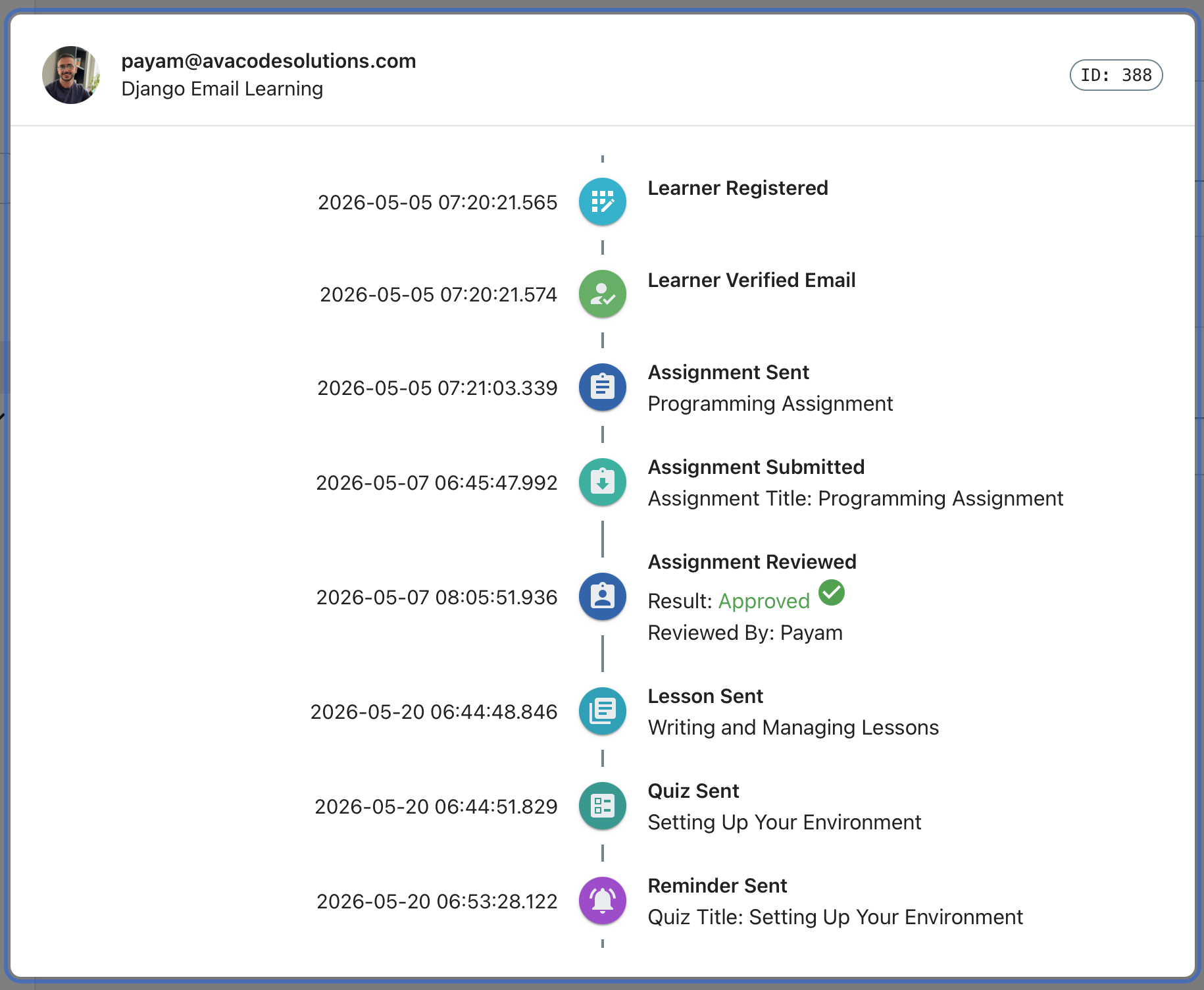
Clicking on any learner’s email address opens a detailed view providing comprehensive information about their learning journey.
- Course-Specific Progress
For each enrolled course, you can access: - Content Progress: Which lessons have been delivered and viewed - Quiz Performance: Scores, attempts, and completion status - Timeline View: Chronological learning activity
Learner Capacity
You can cap the number of learners an organization is allowed to enroll. This applies across every enrollment path — the platform UI, the public enrollment page, Google Workspace group enrollment, and IMAP-based enrollment.
Configuration
The cap is nested under DJANGO_EMAIL_LEARNING in your Django settings:
DJANGO_EMAIL_LEARNING = {
    "LEARNERS": {
        "MAX_LEARNERS_PER_ORGANIZATION": 500,  # default: 0 (unlimited)
    },
    ...
}
MAX_LEARNERS_PER_ORGANIZATION sets a global cap applied to every organization. A value of 0 (the default) means unlimited. A learner who is already enrolled somewhere in the organization is never blocked by the cap — it only applies when a new learner would be created.
The cap only counts distinct learners with at least one active enrollment (EnrollmentStatus.ACTIVE). Learners with no enrollment, or only unverified, completed, or deactivated enrollments, don’t count against it — and a learner active in multiple courses only counts once.
When the cap is reached, new enrollment attempts fail with a 403 response and no Learner record is created.
Per-organization overrides
If you need a different limit per organization (e.g. tiered plans), set LEARNERS_CAP_RESOLVER to the dotted path of a callable that receives the Organization instance and returns its cap:
DJANGO_EMAIL_LEARNING = {
    "LEARNERS": {
        "LEARNERS_CAP_RESOLVER": "myapp.capacity.get_learners_cap",
    },
    ...
}
# myapp/capacity.py
from django_email_learning.models import Organization

def get_learners_cap(organization: Organization) -> int:
    # e.g. look up a per-organization quota from your own billing/plan model
    return organization.plan.max_learners
When LEARNERS_CAP_RESOLVER is set, it takes precedence over MAX_LEARNERS_PER_ORGANIZATION for every organization.
Checking capacity without enrolling
Organization.can_enroll_learner() returns whether the organization currently has room for another learner. It’s used to:
Include a
can_enroll_learnerboolean in the platform’s organization API responses (GET/POSTon the organization detail endpoint), so the admin UI can disable the “add learner” action without exposing the actual cap or learner count.Include an
enrollmentOpenboolean in the public organization and course page context (appContext), so the public enrollment form can disable itself.